Navigation:
Introduction
>
Interface
Show/Hide Hidden Text
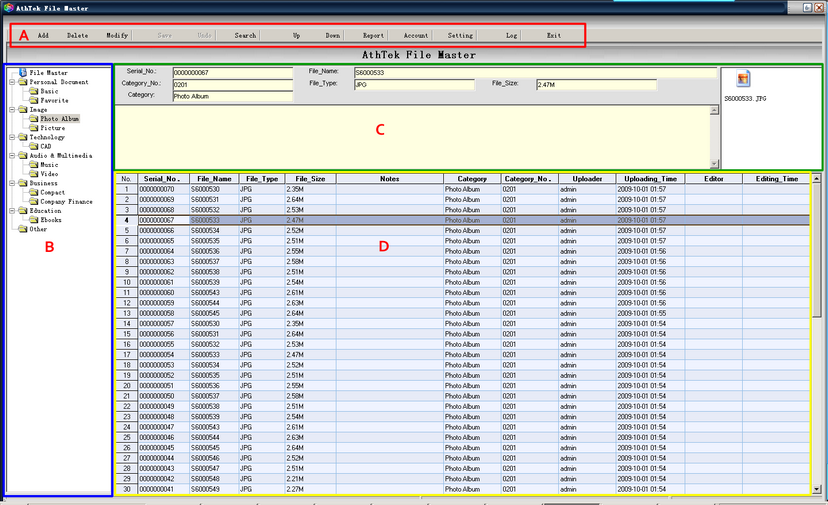
Part. A: Basic options for this program
•
Add:
add a single file to one of your existing categories.
•
Delete:
delete a selected file from your list.
•
Modify:
to change the file info from Part. C
•
Save:
save files to your binary database.
•
Undo:
cancel the action.
•
Search:
search named files from your binary database.
•
Up:
shift up selected file in the list.
•
Down:
shift down selected file in the list.
•
Report:
Export your file list as an EXCEL File.
•
Account:
manage your user's accounts.
•
Setting:
basic settings for your files.
•
Log:
Files' log
•
Exit:
shut down the program.
Part. B: Default categories.
•
File Master
: show the file list of your saved binary database.
•
Tip:
right-click on one of the category, user can add subdirectories, modify or delete the category.
Part. C: File info.
•
Serial_No
: The serial ID assigned by the system.
•
File_Name
: name of the file.
•
Category_No
: the ID of the category which this file is saved in.
•
File_Type
: the file's format.
•
File_Size
: file size.
•
Category
: the directory name which the file is saved.
•
Notes
: additional information to the file.
•
Preview
: File's preview area.
Part. D: file list.
•
Uploader
: user who added this file.
•
Uploading
Time: action time.
•
Editor
: user who has modified this file.
•
Editing_Time
: action time.