Free Google Desktop Translator
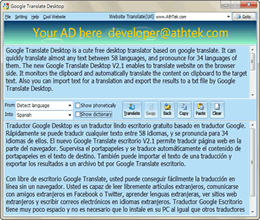 Google Translate Desktop is a free portable desktop translator based on google translate. It can quickly translate almost any text in 58 languages, and pronounce for 34 languages of them. It also enables users to translate website directly. It monitors Windows clipboard and automatically translate the content to target language. Also you can import text file and export the translations to a new *.txt file by Google Translate Desktop. In one word, Google Translate Desktop is a smart desktop translator for Windows users.
With free Google Translate Desktop, you can easily get the online translation without opening Google Translate. You are able to read foreign articles, communicate with foreign friends on facebook or twitter, learn foreign languages, view foreign websites and write emails in foreign languages easily. As a free portable desktop translator, Google Translate Desktop takes a little disk space. You don't need to install it to your PC like other free desktop translators. You can just run it and it will work for you directly.
Be Used For
Reading Foreign Article:
Google Translate Desktop can help you in reading foreign articles easily. Sometimes you want to read an article by foreign authors, but you feel hard to understand the foreign languages. “What the hell is that?” Even you know there is important message in that article, you couldn’t know clearly what they mean. With Google Translate Desktop, you can easily translate the whole article into your own language. You can also translate just a single word or sentence to target language. It will help you to easily get the key of the foreign article.
Communicating with Foreigners:
Google Translate Desktop helps you to send a quick response when you are communicating with foreign guys via FaceBook or Twitter. We have many friends all over the world, but usually they are using an unknown language that we can’t know exactly what they mean. With Google Translate Desktop, we are able to know what they mean no matter what language they are using. Also we can post in their languages on FaceBook and Twitter!
Viewing Foreign Websites:
Google Translate Desktop enables us to use the services on foreign websites. Usually there are many interesting things on foreign websites. We want to download those free resources but we don’t know how. It drives us mad to find the right entry to the free resources. Google Translate Desktop can help with this issue. Simply input the target link of webpage, then the whole website will display itself in our language. We can easily find the entry to the free resources we want by using Google Translate Desktop!
Key Features
-

Pronunciation
Google Translate Desktop provides pronunciation function to help with reading foreign language better. Built-in powerful pronunciation system supports both word and sentence pronunciation in a fluent voice. -

Translate Webpage
Google Translate Desktop can help you to translate a webpage for easily viewing. With this function, you can easily find the ree resources you want on a foreign website, no matter what language it is. -

Clipboard Monitoring
Google Translate Desktop can keep an eye on the clipboard. It will automatically detect the text on clipboard and translate it into target language without copy and paste the text to the translate box. -

Automatically Identify the Input Text
Google Translate Desktop automatically detects the input language. No matter what language the text really is, all the text will be translated into the target language as your demand automatically. -

Support Translating Imported Files
With Google Translate Desktop, you don’t need to open and copy the content from a TXT to the translate box. It supports translating the importing files directly, including *.txt, *.ini, *.log, *.inf file formats. -

Support to Export Translation Results
You don’t need to copy the translation results and save it by hand. Google Translate Desktop enables you to export the translate result to *.txt files. This will be very helpful in long article translating. -

Support Romanization
Some languages maybe pronounced by Romanization. Many other translate tools don't support Romanization, which is the advantage of Google Translate Desktop over its follower. -

Support Online Dictionary
As a smart desktop translating tool, Google Translate Desktop also supports online dictionary. Results are quoted from Google Translate online, even uncommon words can be found in Google Translate Desktop. -

Live Update
The updating process is realized only by one click. Once there is a new update, the program will notify you by a pop-up window. Press update on the pop-up window, and the program will update automatically. -

Free for Use
Google Translate Desktop is totally FREE for lifetime use. You don’t need to pay for a charged translator or dictionary, and the updating service is free too. If you like it, please help us recommend it to your friends. -

Safe and Clean
It is just a desktop program which you don't need to install or uninstall on your computer. Just put this program on your Windows Desktop and run it when translation is needed. Also it is nearly 0 CPU occupied. -

Compatible with Windows 7
Google Translate Desktop has abundant running experiences on Windows NT, 2000, XP, Vista and Win7. Highly-appreciated compatibility makes it more convenient and versatile for daily translation work.
System Requirements
| OS | Microsoft® Windows 2000, XP, Windows Vista, Windows 7 and 8 |
| Processor | 1GHz Intel/AMD processor or above |
| RAM | 256MB RAM (512MB or above recommended) |
| Free Hard Disk | 100KB space for installation |
| Graphics Card | Super VGA (800×600) resolution, 16-bit graphics card or higher |

Users' Review
 This program won my favor at the first sight. I used to use Google Translate Online to scan Websites or communicate with my foreign friends, but I soon found that sometimes it was not so stable to handle, till i found this translator. I have recommended it to many of my friends. I really love this! ------------------------------- Julie Cowell, HR from North Dakota
Related Software
- IP - MAC Address Scanner
IP - MAC Scanner is a smart network tool for home user or small business owner to fast scan and analyze all the connections to their network. - Free Voice Changer
Flexibly change the voice pitch of imported audio file.
Tags
- free google translate, free google translation, google dictionary, google translate client side, translate english, translate spanish, translate Japanese, translate chinese, translate germany
Free Desktop Translator

Free desktop translator based on Google Translate. It is the best free desktop translator in the world. It supports 58 languages and can pronounce 34 of them. Business owners can use the top banner of it for business promotion.