
Place a Secure Order for Reinstall DirectX EZ
 |
One-time charge for lifetime use! The registration code will be sent to you instantly in an email by RegNow. Once registered, all the limitations will be instantly removed!
Support Credit Card (Master/Visa/Discover), PayPal (USD Only), Bank/Wire Transfer with invoice.
Note: we priced this product in US Dollar. No matter what currency you are using, the charge will be automatically recalculated to US Dollar. In some case you will be charged more with non-USD currency. We kindly ask you to adjust the currency setting to US Dollar and you won't suffer a loss from foreign exchange.
Once you click the "BUY NOW" buttion, you will see the form as below:
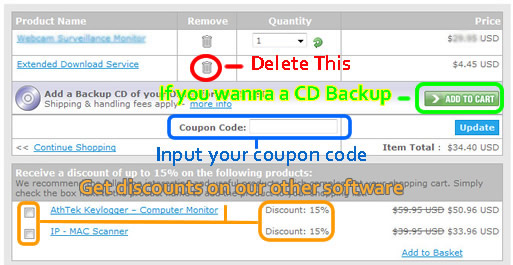
As you can see from the snapshot, we advice that:
a. you may delete the "Extended Download Service", because you can download the latest version from our website whenever you want, and this will cost you additional money. You don't have to pay for that.
b. If you wanna a CD backup, click the "ADD TO CART" button, then the CD will be post to you.
c. If you have a discount coupon, please enter it to the box then click "Update". Don't have a discount coupon? Browser here to get one!
d. Want to add another software to your order? Simply check the boxes you want to add, you will get them with discount!
|
Why I need to purchase a full version?
Purchasing from our official website is the most safest and direct way to get the official registration code and customer service for Reinstall DirectX EZ. Without the registration code, you can only use a free trial version of Reinstall DirectX EZ which contains limited features.
We provide free registration code to some of our costomers. Click the red button above to finish the task and get your free registration code now!
System Requirements
| OS | Windows 98/2000/2003/2008 (R2)/XP/7/8/8.1/10/Server (R2) |
| Processor | 1GHz Intel/AMD processor or above |
| RAM | 256MB RAM (512MB or above recommended) |
| Free Hard Disk | 1GB space for installation |
| Graphics Card | Super VGA (800×600) resolution, 16-bit graphics card or higher |
Reinstall DirectX EZ

Reinstall DirectX EZ is an emergency system tool which enables video game players to solve DirectX problems completely, individually and effortlessly.
Users' Review
 Happened to a fatal directx error when playing game on my vista x64 system. Searched for the solutions to directx errors, but found nothing useful to me. Finally I found your reinstall directx ez, and I got all the directx problem solved! What I like it best, your program does not require to reinstall the operating system while the process of reparing directx.
------ gamer from Great Britain
Tags
- install DirectX, DirectX error, uninstall DirectX, DirectX diag, DirectX problem, fix DirectX, repair DirectX, control DirectX, DirectX rollback, revert DirectX, restore DirectX, install DirectX 9.0c, uninstall DX, guarantee game running, fatal DirectX error, install DirectX 11, install DX, DXdiag, DX error, fatal DX error, install DX 11, DX problem, fix DX, repair DX, control DX, DX rollback, revert DX, restore DX, reinstall DX
Related Tools
- System backup and restore
AthTek Data Recovery supports to fast backup and restore the operating system as well as the important files. - AthTek Registry Cleaner
AthTek Registry Cleaner supports Windows users to clean, repair and optimize registry in seconds. It can solve most application problems in Windows.